Put your Canton node on Transparent.
A short walkthrough of registering your Canton participant node and serving API traffic through the Transparent pool.
splice-validator project), and your node endpoints are not yet exposed through any web server. This guide is the unified configuration we expect from every operator on the platform.To join the pool, your node must expose exactly three endpoints — they map 1:1 to the "Connect a participant node" form in the app — plus OAuth client credentials from your identity provider.
| Endpoint | Source (container) | Public URL you will enter in the app |
|---|---|---|
| JSON Ledger API | participant, port 7575 | https://node.example.dev/json-api |
| gRPC Ledger API | participant, port 5001 | node.example.dev:8443 (TLS: Yes) |
| Validator API | validator-app, port 5003 | https://node.example.dev/api/validator |
nginx service + nginx.confin the splice-validator project) — it exists for the local wallet/CNS UIs on localhost, and the platform does not use it. We terminate TLS on an nginx running on the host and proxy from there to your containers. CORS headers (like splice's cors-headers.conf) are unnecessary here too: the platform calls your endpoints server-to-server, not from a browser.The stock splice compose exposes no participant/validator ports on the host at all. Add exactly these host mappings, bound to 127.0.0.1 so only the host nginx can reach them — never publish them on a public interface. These are the only port changes versus the stock splice compose.
  participant:
    # ...
    ports:
      - "127.0.0.1:7575:7575"   # JSON Ledger API
- "127.0.0.1:5001:5001" # gRPC Ledger API validator:
# ...
ports:
- "127.0.0.1:15003:5003" # Validator API (container port 5003)Apply the changes and verify the mappings:
docker compose up -d participant validator

# confirm the mappings (host-side port is left of ->)
docker ps --format "{{.Names}}\t{{.Ports}}" | grep -i participant

# validator version is public — expect a JSON version response
curl -s http://127.0.0.1:15003/api/validator/version

# any HTTP response here (even 401) means the JSON Ledger API is reachable
curl -s -o /dev/null -w "%{http_code}" http://127.0.0.1:7575/v2/state/ledger-end127.0.0.1 and firewalled.Prerequisites:
- A DNS A record pointing your node hostname (example:
node.example.dev) at the host. - A TLS certificate for it (e.g. certbot/Let's Encrypt).
- nginx installed on the host.
# ─── HTTPS: JSON Ledger API + Validator API ───
server {
    server_name node.example.dev;

    listen 443 ssl;
    ssl_certificate     /etc/letsencrypt/live/node.example.dev/fullchain.pem;
    ssl_certificate_key /etc/letsencrypt/live/node.example.dev/privkey.pem;

    # JSON Ledger API (participant, localhost:7575)
    # Trailing slash strips the prefix:
    #   /json-api/v2/state/ledger-end → 127.0.0.1:7575/v2/state/ledger-end
    location /json-api/ {
        proxy_pass http://127.0.0.1:7575/;
        proxy_set_header Host              $host;
        proxy_set_header X-Real-IP         $remote_addr;
        proxy_set_header X-Forwarded-For   $proxy_add_x_forwarded_for;
        proxy_set_header X-Forwarded-Proto $scheme;
        proxy_pass_request_headers on;

        # submit-and-wait can take a few seconds under load
        proxy_connect_timeout 5s;
        proxy_read_timeout    60s;
        proxy_send_timeout    10s;
    }

    # Validator version (PUBLIC) — the platform health probe reads this
    location = /api/validator/version {
        proxy_pass http://127.0.0.1:15003/api/validator/version;
        proxy_set_header Host              $host;
        proxy_set_header X-Real-IP         $remote_addr;
        proxy_set_header X-Forwarded-For   $proxy_add_x_forwarded_for;
        proxy_set_header X-Forwarded-Proto $scheme;
    }

    # Validator API (validator-app, localhost:15003)
    location /api/validator/ {
        proxy_pass http://127.0.0.1:15003/api/validator/;
        proxy_set_header Host              $host;
        proxy_set_header X-Real-IP         $remote_addr;
        proxy_set_header X-Forwarded-For   $proxy_add_x_forwarded_for;
        proxy_set_header X-Forwarded-Proto $scheme;
        proxy_pass_request_headers on;

        proxy_connect_timeout 5s;
        proxy_read_timeout    30s;
        proxy_send_timeout    10s;
    }

    # Cheap liveness check that doesn't depend on any upstream
    location = /health {
        default_type application/json;
        return 200 '{"status":"ok"}';
    }

    # Default deny everything else
    location / {
        default_type application/json;
        return 404 '{"error":"not found"}';
    }
}

# ─── gRPC Ledger API (TLS) ───
# Terminates TLS and forwards to plaintext gRPC on 127.0.0.1:5001.
# The participant validates the Bearer token itself — no nginx-level auth here.
server {
    listen 8443 ssl http2;
    listen [::]:8443 ssl http2;
    server_name node.example.dev;

    ssl_certificate     /etc/letsencrypt/live/node.example.dev/fullchain.pem;
    ssl_certificate_key /etc/letsencrypt/live/node.example.dev/privkey.pem;

    # Ledger streams are long-lived; default 60s reads would kill them
    grpc_socket_keepalive on;
    client_body_timeout   1h;
    grpc_read_timeout     1h;
    grpc_send_timeout     1h;
    grpc_buffer_size      16k;

    location / {
        grpc_pass grpc://127.0.0.1:5001;
    }
}
Key points:
- Prefix strip happens via the trailing slash on
proxy_pass—/json-api/v2/…becomes/v2/…upstream. - Port 8443 because the participant container already holds
127.0.0.1:5001— nginx terminates TLS on 8443 and forwards plaintext locally. - The participant still validates the OAuth Bearer token on every call — TLS plus token, defense in depth.
- Wallet/CNS UIs are unaffected — splice's own nginx keeps serving those on localhost.
Apply and verify:
nginx -t && sudo systemctl reload nginx

curl -s https://node.example.dev/health                    # {"status":"ok"}
curl -s https://node.example.dev/api/validator/version     # version JSON

grpcurl -H "authorization: Bearer <M2M_TOKEN>" node.example.dev:8443 list- Allow inbound TCP 443 and 8443 from the internet.
- Nothing else new — 7575/5001/5003 stay bound to localhost.
- Keep 5002/10013 closed.
In the app, open the Nodes tab → "Your participant nodes" → "Connect a node". Fill the form as follows:
| Form field | What to enter |
|---|---|
| Node name | Any label, e.g. my-participant-1 |
| Canton network | The network your node runs on — devnet, testnet or mainnet |
| JSON Ledger API URL | https://node.example.dev/json-api |
| gRPC host / Port / TLS | node.example.dev / 8443 / Yes |
| Validator API URL | https://node.example.dev/api/validator |
| OAuth token URL | Your IdP's token endpoint, e.g. https://auth.example.dev/oauth/token |
| OAuth client ID / client secret | The machine client your ledger API auth uses — the same credentials as VALIDATOR_AUTH_CLIENT_ID / VALIDATOR_AUTH_CLIENT_SECRET in your splice env |
| OAuth scope | daml_ledger_api (unless your IdP needs another) |
| Audience | daml_ledger_api — sent as the audience token parameter |
| Ledger User ID — optional | The node's ledger-api user; granted actAs on parties we allocate there — leave blank to add later |
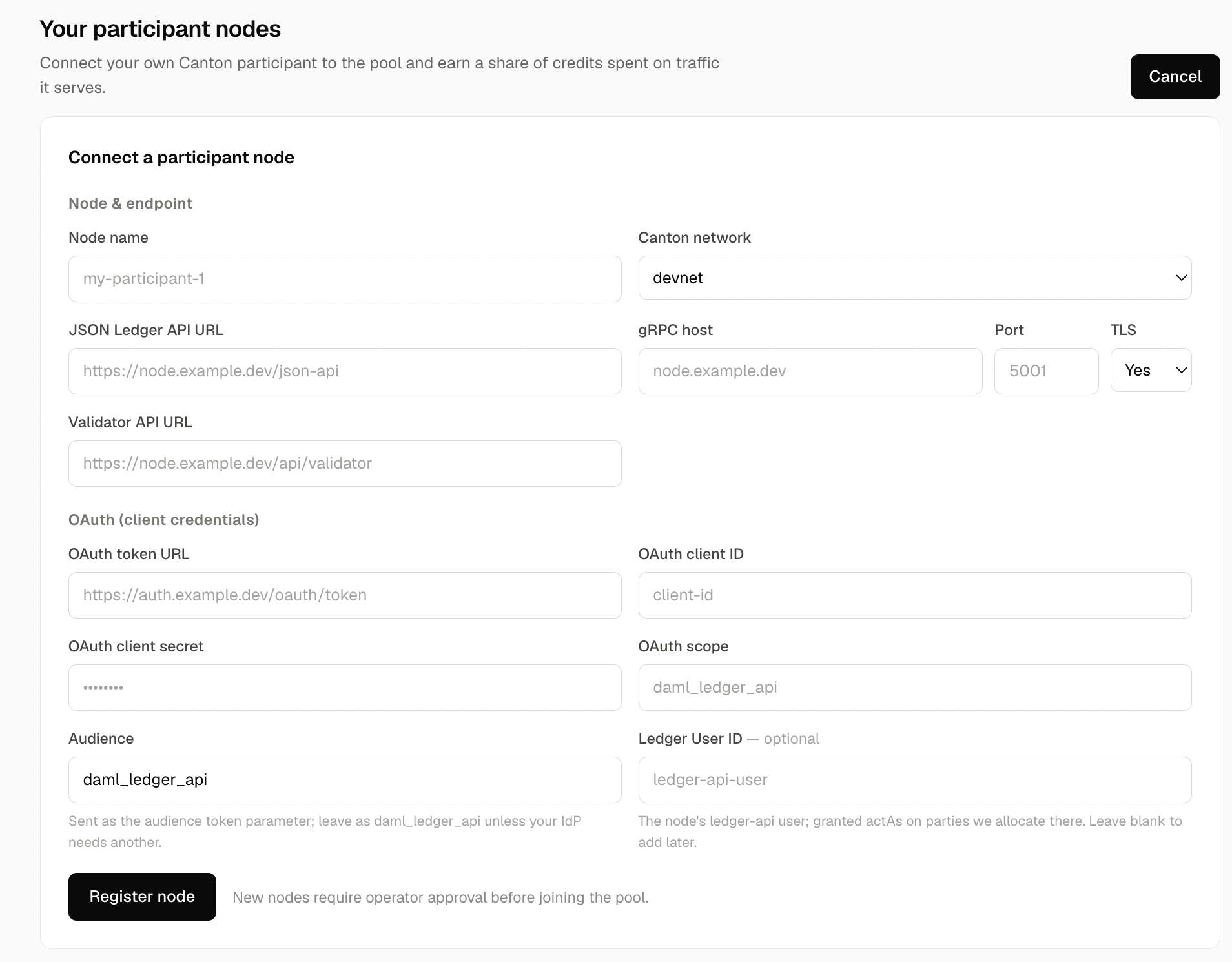
New nodes require operator approval before joining the pool. After approval, the node joins the routing pool and starts earning a share of the credits spent on the traffic it serves.
- Compose ports mapped to
127.0.0.1. docker psshows 7575/5001/15003.- nginx
nginx -tclean and reloaded. https://<host>/healthreturns{"status":"ok"}./api/validator/versionreturns JSON.grpcurl … :8443 listreturns services.- Node registered in the app.
- Approval received.
Once approved, your node appears in the routing table and earns a share of the credits spent on the traffic it serves.